Podcasting 2.0, all the way through.
Network-level metadata for every show you run, held in your own vault. Downlink parses the 2.0 namespace rather than skipping it, and writes what it finds into notes you can search, query and keep.
What gets parsed
The tags most apps drop on the floor.
alternateEnclosure
Drives HLS playback
chapters
Table in the note, tab in Preview
transcript
URL, type, language and rel
funding
A Support button per target
guid
Logged, so nothing duplicates
podping
Publish notifications
podroll
Recorded on the show note
remoteItem
Cross-feed references
Publisher intent is recorded, not overridden: locked, block, complete and new-feed-url are ingested and surfaced.
HLS playback
One episode, two shapes.
An episode keeps the standard enclosure every podcast app in the world can play, and hangs its adaptive stream off it as an alternate. Downlink sorts both into an audio slot and a video slot, then plays the right one.
HLS wins by default and falls back to the standard file if the stream fails. Tested against the Podcast Standards Project's HLS reference feed.
Chapters
The note is the record.
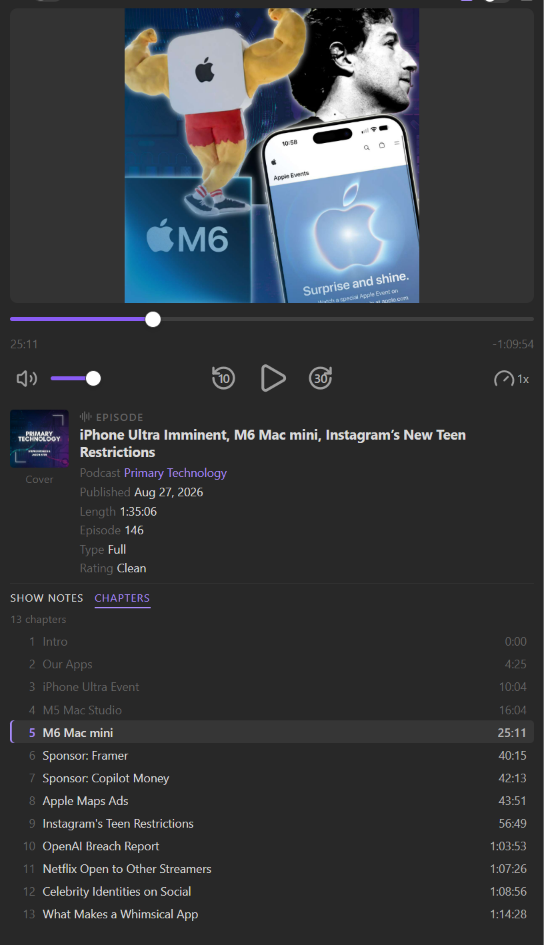
A chapters file becomes a table in the note body — number, title, start time, plus links and artwork where they exist. Edit a title or delete a row and that is what Downlink shows you.
When a publisher corrects a chapter after release, the feed's row grows an Update chapters button. It waits for the click. Downlink does not rewrite your notes on a schedule.
Questions
Read the full FAQHow do I add a podcast?
There are three ways to add a podcast feed.
Apple Podcasts (easiest): Just start typing. Anything indexed by Apple can be found. (You can turn off Apple Podcasts search in Advanced Settings at any time).
RSS URL: Copy and paste the RSS feed URL. Best for premium feeds (e.g., Patreon) and unindexed shows.
Podcast Index (hardest): Add your Podcast API key to the Obsidian Keychain. Expand search capabilities to include Podcasting 2.0 tags and shows not indexed by Apple Podcasts.
Can I play episodes from inside the vault?
Yes. Downlink's Preview panel can play audio and video podcasts, including HLS video from the <podcast:alternateEnclosure> tag.
Does Downlink download media files?
No. Downlink defaults to streaming so as to minimize disk space. You can download media files if you want.
Which Podcasting 2.0 tags does it read?
Any standard RSS feed works, but where a feed carries the Podcasting 2.0 namespace Downlink parses it rather than skipping it.
chapters becomes a table in the note body: number, title, start time, plus links and artwork where they exist. transcript is recorded with its URL, type, language and rel, so you can find the right file without opening a player. funding targets become Support buttons, and podroll, remoteItem, guid and podping are all kept.
Does re-syncing duplicate my notes?
No. Episode GUIDs are logged, so a re-sync updates what changed and leaves the rest alone. Publisher intent is recorded rather than overridden — locked, block, complete and new-feed-url are ingested and surfaced.
Every show you run, in one vault.
Downlink is in private beta. Join the waitlist and we'll email you when it's available.
Join the waitlist